


Enterprise AI production with compliance you can count on
The story-based AI production console built for studios, agencies, and creative teams — with the security, controls, and legal protection your organization requires.
Give your team creative power, legal protection, and full ownership
FilmSpark Enterprise gives creative teams the most powerful AI production workflow on the market — while giving leadership full control over access, spend, compliance, and IP ownership. From first draft to final delivery, everything stays in one place.
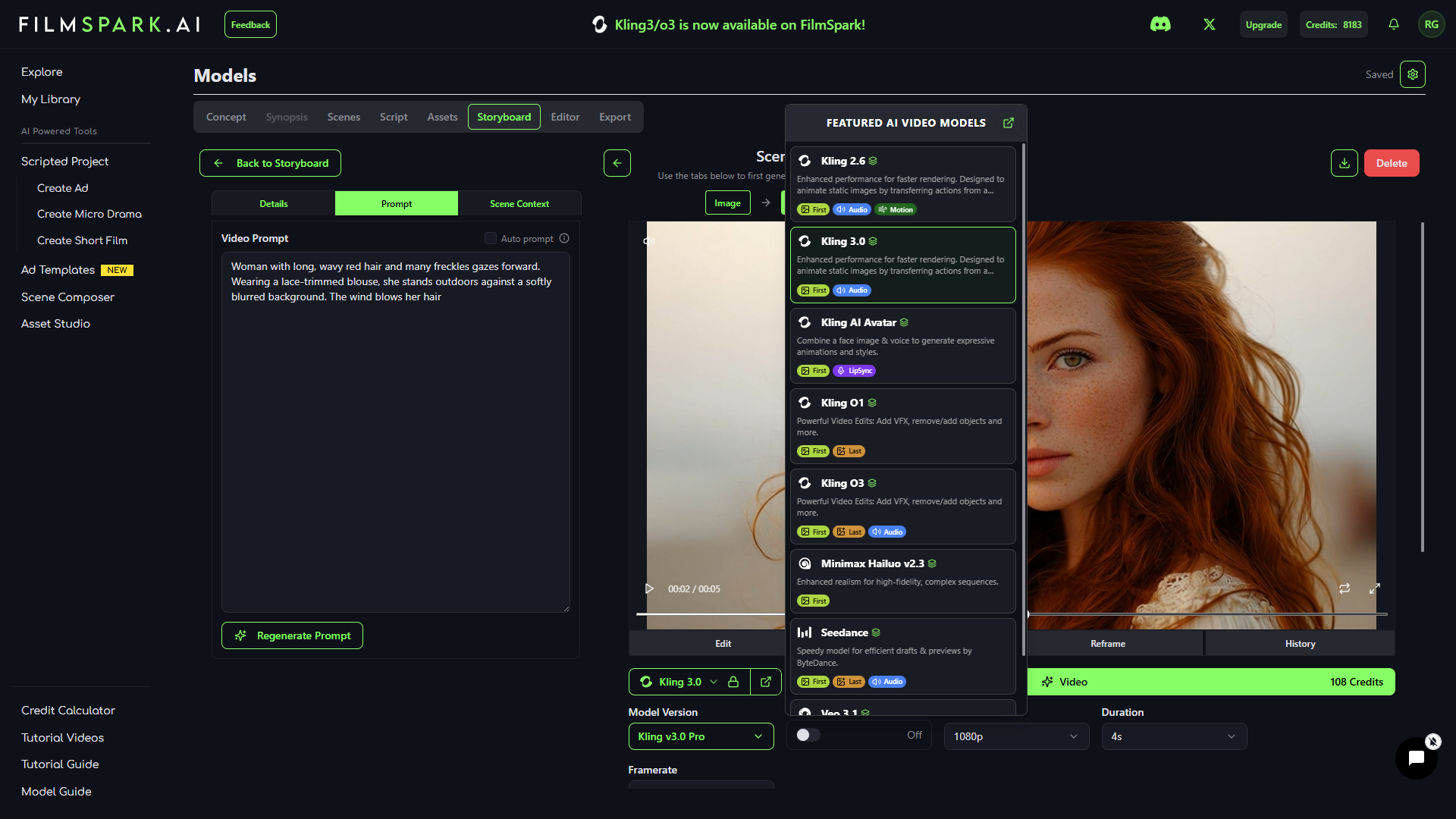
Every model. One console.
Access the industry's top generative models for image, video, and audio — all inside a unified production workflow. Your admin chooses which models are available. Your team focuses on the story.
Admin & governance
Controls that scale with your studio.
Creative teams get every frontier model in one console. Leadership gets to decide who reaches which one, what it costs, and what happened after.
Model governance
Your admin decides which models the organization can reach, and which of those a given project is allowed to spend credits on, before it spends them.
- Allow or block any model organization-wide
- Per-project model and spend permissions
- New models reviewed before they go live to your team
- Endpoints unsuitable for final production are marked in the app, not left to guesswork
Usage & spend
Pricing is based on what you generate, not how many people are generating it. See where the budget is going by project, by person, by week.
- One shared credit pool, no per-seat pricing
- Per-project and per-user burn-down
- Credit limits set per team or per production
- Workspace size set to fit your team in your agreement
Roles & access
Owner, Admin, Member and Viewer roles across shared workspaces, so a freelancer on one production never sees another client's material.
- Role-based access on every workspace
- Shared projects and shared asset libraries
- Multi-factor authentication available for team accounts
- Documented process for removing access when someone rolls off
Provenance
Every shot exports with its recipe.
One command exports the whole production: every actor, location and prop, and every shot, with the prompts that made it, the full chain of models it passed through, and the reference images that anchored it.
When a client asks how was this made, you don't reconstruct it from memory. You send the file. Cast bible, location bible and shot list in one artifact, and the record travels with the work.

Handoff
It ends in Premiere and Avid.
Export an XML your editor opens, with every clip named by your own convention. Project, scene, shot index, format, model. Set the template once and the footage arrives in the cutting room named the way your assistant editor already expects.
Most tools end at generation. Ours ends at the edit. That is the difference between a demo and something a production department can absorb.
Ownership & indemnification
Coverage that follows the production.
What your team makes belongs to your team. Full commercial rights to everything created in FilmSpark under your agreement, and we do not use your projects, prompts, assets or outputs to train models.
We defend the claim
FilmSpark defends and indemnifies you against third-party claims that output from FilmSpark infringes copyright, trademark, patent or trade secret rights.
- Applies to models cleared for production use, which are marked as such in the app
- We control the defense and bear the cost
- We can license, replace or regenerate the affected shot rather than pull your production
- Amounts we recover upstream from model providers pass through to you
It reaches your partners
The same coverage extends to the people who need it during a sale. This is the clause business affairs asks about first, and most platforms do not have one.
- Affiliates and production partners
- Financiers, distributors and exhibitors
- Broadcasters and streaming platforms
- Licensees, successors and purchasers of the production
We will walk your counsel through the full terms before you sign, and we would rather have that conversation early than have it come up in redlines.
Security & compliance
We publish the gaps too.
Studio security teams find everything eventually. So we put our controls, our vendor chain, and the things we have not finished yet in the same place.
Our controls
A written information security program, not a badge. Structured on NIST CSF 2.0 and reviewed as the product changes.
- Policies covering access control, secure development, vendor risk, retention and incident response
- Named incident lead, documented response runbook, breach notification within 72 hours of confirming an incident
- Multi-factor authentication available for team accounts, with a documented access removal process
- We do not train models on customer content
Our vendor chain
Every provider that touches your material is named, and their evidence is theirs to give you directly.
- All model inference routes through fal.ai, which holds a SOC 2 Type II report covering the Security criteria
- fal completed an independent penetration test in 2026 with no critical and no high findings
- Database, storage and authentication on Supabase and Clerk. Billing on Stripe
- Full subprocessor list published and kept current
- Request fal's report directly at trust.fal.ai
What we do not have yet
The honest column. If any of these are a hard requirement for your review, tell us now rather than after a pilot.
- FilmSpark's own SOC 2 Type II is in progress. We are not certified today
- ISO 27001 is on the roadmap and has not started
- Single Sign-On through your identity provider is in development
- We answer security questionnaires directly and welcome full reviews under NDA
fal.ai's SOC 2 report covers fal's own controls and carves out its cloud hosting provider. It is fal's attestation, not FilmSpark's. We name it here because it is part of the chain your material passes through, not as a substitute for our own.
Onboarding and support
Dedicated onboarding, training built around your workflow, live Q&A and priority support. We help your team get productive, not just get access.
FilmSpark Studios
Need it produced for you? Our in-house creative studio takes brand work from concept to delivery inside the same console your team uses.
Let’s talk Enterprise
Our team is here to help with advanced capabilities tailored for studios and brands like yours. If you want to learn more about our Enterprise offering, please fill out the form.

ENTERPRISE FAQ
What is FilmSpark.ai?
FilmSpark.ai is a professional AI production console that lets creative teams go from script to finished video in one place. Unlike tools that generate isolated clips or images, FilmSpark is built around story. You define your characters, lock your visual style, and produce entire sequences with continuity across every shot. It is designed for agencies, studios and production teams who need broadcast-quality output at scale.
What makes FilmSpark.ai different from other AI video tools?
Most AI video tools are shot-based. They generate one clip at a time with no memory of what came before. FilmSpark is story-based. The platform maintains character identity, visual style and narrative continuity across an entire project, so your protagonist looks the same in shot 1 and shot 50, your lighting stays consistent, and your team works in a single console instead of jumping between five different tools.
Who is FilmSpark.ai for?
Professional creative teams. Ad agencies running high-volume campaigns, film studios in pre-production, microdrama producers scaling vertical content, and in-house brand teams producing video at speed. If your work requires narrative consistency, character continuity and production-quality output rather than one-off clips, FilmSpark is built for you.
What is the best way to get started?
For Enterprise, the best starting point is a guided demo with our team. We will walk through how FilmSpark fits your specific workflow, whether that is ad production, pre-visualization, pitch decks or long-form content. From there we set up your workspace, configure model access, and onboard your team with dedicated training. Fill out the contact form and we will be in touch within 24 hours.
How does FilmSpark generate visuals and video?
FilmSpark integrates multiple best-in-class generative models for image, video and audio. You work inside a unified production workflow: write or import a script, build a storyboard, define your characters and locations as reusable assets, then generate and sequence your shots. The platform handles model orchestration so your team can focus on the creative.
How does team access work?
Enterprise accounts run as shared workspaces where your team works in the same projects, uses the same asset libraries, and builds on each other's shots. Admins manage roles, permissions and credit allocation from a central dashboard, with Owner, Admin, Member and Viewer levels.
Pricing is based on generation volume, not seat count, so adding a producer or an editor to a workspace does not change what you pay. Workspace size is set in your agreement to fit your team.
Are we covered if someone claims our AI content infringes their IP?
For output generated through a model cleared for production use, and used under your agreement, yes. FilmSpark defends and indemnifies you against third-party claims of copyright, trademark, patent or trade secret infringement. We control the defense and bear the cost, and where a shot is challenged we can license, replace or regenerate it rather than pull your production.
The coverage extends to your affiliates, production partners, financiers, distributors, exhibitors, broadcasters, streaming platforms, licensees and purchasers of the production. Most platforms cover only the direct customer.
Two limits worth knowing up front. Material you supply is yours to clear, including reference images, footage, scripts, marks and the names, voices or likenesses of real people. And models we have not cleared for production use are marked as such in the app, and output from those is not covered. We will walk your counsel through the full terms before you sign.
Do you have SOC 2 or ISO 27001?
Not yet, and we would rather say so here than in a security review. FilmSpark's own SOC 2 Type II is in progress and ISO 27001 is on the roadmap.
What we do have is a written information security program structured on NIST CSF 2.0, covering access control, secure development, vendor risk, retention and incident response, with a named incident lead and a documented response runbook. Multi-factor authentication is available for team accounts and we have a documented process for removing access.
Our inference provider, fal.ai, holds a SOC 2 Type II report covering the Security criteria and completed an independent penetration test in 2026 with no critical or high findings. That is fal's attestation of fal's controls rather than ours, and you can request it directly at trust.fal.ai. We answer security questionnaires directly and welcome a full review under NDA.
Does FilmSpark.ai train on user input or generated content?
No. Your projects, assets, prompts and generated content are yours. We do not use customer data or generated outputs to train AI models. Enterprise clients receive full contractual assurances around data handling, privacy and IP ownership.
Can I use FilmSpark.ai outputs commercially?
Yes. Anything you create inside FilmSpark.ai is yours to use, commercially or non-commercially, under our licensing terms. We are committed to supporting creators and brands with full commercial rights to their work.
Can we get the files into Premiere or Avid?
Yes. FilmSpark exports XML for Premiere and Avid, with custom filename templates so every clip arrives named by your own convention using variables like project, scene, shot index, format and model. Set the template once and the footage lands in your editor named the way your cutting room already expects.
Every project also exports a provenance manifest: every shot with the prompts that made it, the full chain of image, video and audio models it passed through, and the reference images that anchored it, alongside your cast, locations and props.
Can I edit videos in FilmSpark.ai?
FilmSpark handles the production pipeline from script through storyboard to generated video and audio, and it includes a sequencing editor for assembling your cut. For final finishing, color and advanced post, most teams export to Premiere, Resolve or Avid, which is what the XML export is built for. We are actively building further post features including AI VFX, style transfer and upscaling.
What video models can I use inside FilmSpark.ai?
FilmSpark integrates a curated selection of the industry's best and latest AI video models, so you always have access to current technology. You can select different models for different shots in the same project. See our Model Guide for the current options.
What image models can I use inside FilmSpark.ai?
Your admin controls which image models the organization can reach, and you choose per shot from what is enabled. The library covers photorealistic, stylized, illustration and anime work, and it changes as new models ship. See our Model Guide for the current list. During onboarding we will walk your team through which models suit your output, and your admin can restrict access to keep everyone on the same look.
How do I choose the right model for my project?
Start with the output you need. Live-action-style work leans toward the photorealistic video models. Storyboards and mood boards run faster and cheaper on the image models. FilmSpark shows model options alongside your generation settings so you can compare and switch without leaving the workflow, and you can use a different model on every shot in the same project. Our team advises on model selection during onboarding.
Can I change models mid-project?
Yes. You can switch between models at any time during your project. Choose the best model per scene or even per shot to fine-tune the output to your needs.
Can I upload brand assets like logos, voice files, or character references?
Yes. You can upload reference images for characters, locations and objects into the Asset Studio and reuse them across every project. You can also import custom voices from ElevenLabs using a Voice ID, so your characters maintain a consistent look and sound throughout your production.
What kinds of styles can I create?
Virtually anything. Photorealistic, cinematic, anime, illustration, editorial, stylized and more. FilmSpark gives you control over visual style at the project level, including lighting environments, color grading and film grain. You can lock a style once and apply it consistently across every shot in a sequence.
Where can I learn more about credit costs and output resolution?
Enterprise pricing is based on credit volume, not seat count. Credit costs vary by model and output type, and by resolution and duration. We will provide a detailed credit breakdown during your Enterprise consultation so you can forecast usage and budget accurately.
Does FilmSpark.ai work with MidJourney?
Yes. If your team already uses MidJourney for image generation, you can bring those images into FilmSpark as reference assets for characters, locations or style. FilmSpark then uses those references to maintain consistency as you generate video, audio and full sequences. Many of our users start with MidJourney images and use FilmSpark to bring them to life as motion.
Can we upload our own models or trained LoRAs?
This is on our roadmap and available for discussion with Enterprise clients. If your team has proprietary models or fine-tuned LoRAs you would like to integrate into the FilmSpark workflow, reach out and we will explore what is possible for your use case.
What is your long-term AI ethics vision?
We believe AI should empower human creativity, not replace it. FilmSpark is built to keep the director in the chair, giving creative professionals more control rather than less. We are committed to transparency about how our models work, responsible use policies, and ensuring that the content our users create respects intellectual property and ethical standards. Our Generative AI Prohibited Use Policy is available on our website.
Still have a question? Talk to us.